This post is the collection of the section set up and use the Talent Application for Dynamics 365 for Talent
Category: Leave and absence

MB6-898 View leave and absence information
In the leave and absence tab of the people workspace you can see all the information on the registered leave and absence. You can see the taken and available hours, you can manage the different plans and see pending leave requests and upcoming time off. You can also enroll in leave plan and request time… Continue reading MB6-898 View leave and absence information

MB6-898 Request time-off in the People workspace
From the leave and absence tab on the people workspace you can request time off by clicking the menu line and + Request time off. Time off In the new window you register type of leave, dates, attachments, comments and see the balance for your different types of leave and absence. You can submit your… Continue reading MB6-898 Request time-off in the People workspace
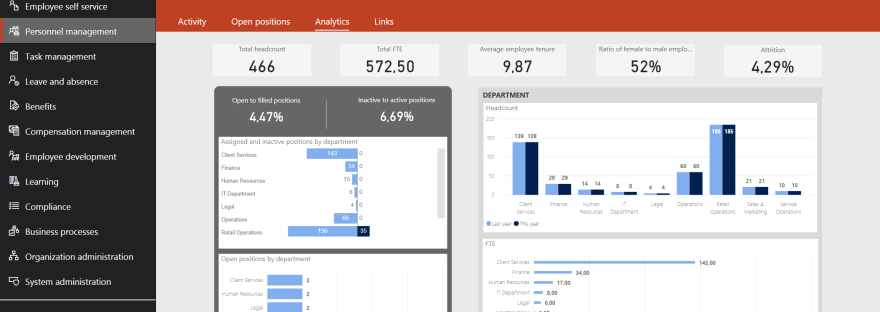
MB6-898 Use People Analytics and Personnel Management in Dynamics 365 for Talent
The next point under Understand the Dynamics 365 for Talent Environment (25 - 30%) is; Use People Analytics and Personnel Management in Dynamics 365 for Talent Describe features of the People workspaceuse the People workspace to view and edit personal informationenroll in benefits by using the people workspacecheck FMLA eligibilityrequest time-off in the People workspaceview… Continue reading MB6-898 Use People Analytics and Personnel Management in Dynamics 365 for Talent

MB6-898 Identify the components of a Dynamics 365 for Talent workspace
Workspaces and functions: People. In this workspace you can search and find information on workers in your organization. You can see who reports to whom, and information about each employee. Employee self service - This workspace contains "My information" where all information that is registered on the person logged in is registered, here you… Continue reading MB6-898 Identify the components of a Dynamics 365 for Talent workspace
 Malin Martnes