The search in the web interface lets you search pages that contains one or more of the words you are typing. You always get the closest hit at the top, and then the other pages and sections that contains the words you are searching for below.

Dynamics 365 and Power Platform
The search in the web interface lets you search pages that contains one or more of the words you are typing. You always get the closest hit at the top, and then the other pages and sections that contains the words you are searching for below.

Workspaces and functions: People. In this workspace you can search and find information on workers in your organization. You can see who reports to whom, and information about each employee. Employee self service - This workspace contains "My information" where all information that is registered on the person logged in is registered, here you… Continue reading MB6-898 Identify the components of a Dynamics 365 for Talent workspace
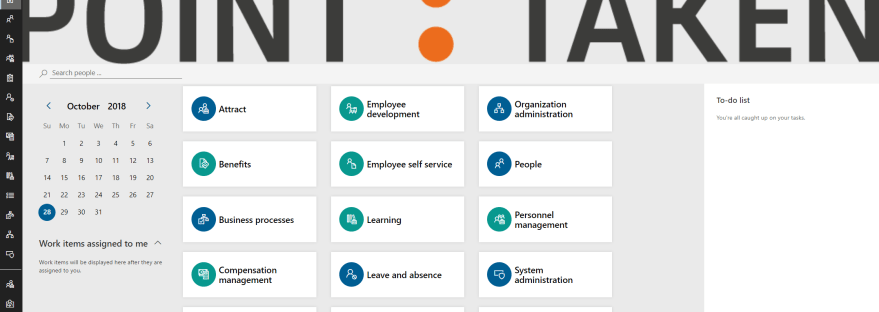
Dynamics 365 for Talent interface To make it easy for you to start working, you have tiles on your home page that represent the workspaces that you have access to. Each tile presents a workspace with all key information, links and reports for each major task area or business process. The workspaces are: People - Here… Continue reading MB6-898 Describe the use case scenarios for workspaces and provide examples of workspaces

Dynamics 365 for Talent interface Dynamics 365 Button – With the Dynamics 365 button you can switch between different Dynamics 365 apps. Such as Attract, HR Core and Onboard.Vafle menu is where you easily can navigate to your other Microsoft systems and the administration interface.Hamburger Menu (Navigation Pane) is used to expand or collapse the navigation… Continue reading MB6-898 Describe the user interface components of Dynamics 365 for Talent

The Excel add-in is, as a consultant, one of my favorite things with Talent, it makes importing data incredible much easier than for example with CRM (Dynamics 365 for Customer Engagement). To access the templets where you can manage your data with the help of Microsoft Excel add-in you go to System administration > Links… Continue reading MB6-898 Describe and use the Microsoft Excel add-in with Dynamics 365 for Talent
 Malin Martnes