Certification, Microsoft Dynamics 365 for Talent, Onboarding

MB6-898 Describe scenarios for using the onboarding modular application

The Onboarding modular application is used to set up new employees to success by introducing them to activities, contacts and resources that will make their start at the company easier. The Onboarding modular application gives the new employee the information about starting working for the company with tasks and checklists to make sure they have… Continue reading MB6-898 Describe scenarios for using the onboarding modular application

Certification, Microsoft Dynamics 365 for Talent, Onboarding

MB6-898 Use the Onboarding Modular application

The first skillset that's testet in the Configure and Use the Onboarding, Offboarding, and Transition Processes (20 - 25%) is Use the Onboarding Modular application, this contains: Describe scenarios for using the onboarding modular applicationcreate, import and migrate employees into the Onboarding modular application

Certification, Microsoft Dynamics 365 for Talent, Onboarding

MB6-898 Configure and Use the Onboarding, Offboarding, and Transition Processes (20 – 25%)

The third skill tested is Configure and Use the Onboarding, Offboarding, and Transition Processes, this lists the following points: Use the Onboarding Modular application Describe scenarios for using the onboarding modular application; create, import and migrate employees into the Onboarding modular application Design and configure welcome guides Describe the components of a welcome guide; create… Continue reading MB6-898 Configure and Use the Onboarding, Offboarding, and Transition Processes (20 – 25%)

Attract, Certification, Microsoft Dynamics 365 for Talent, Onboarding

MB6-898 Start the onboarding process

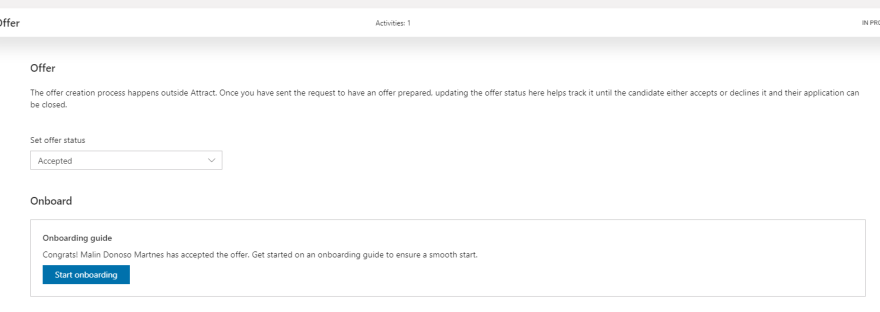
When you change the offer stage status to Accepted or the candidate has accepted the offer a new area appears - Onboard. With the offer app used: Offer accepted Without the offer app: Offer settings accepted With this function you click the button "Start onboarding" and the new employee is transferred to the onboarding app and… Continue reading MB6-898 Start the onboarding process

Dynamics 365 for Talent
Certification, Core HR, Microsoft Dynamics 365 for Talent, Onboarding

MB6-898 Describe the use case scenarios for workspaces and provide examples of workspaces

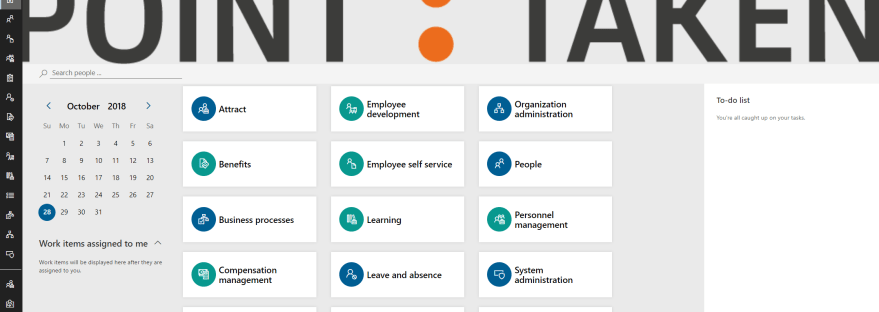
Dynamics 365 for Talent interface To make it easy for you to start working, you have tiles on your home page that represent the workspaces that you have access to. Each tile presents a workspace with all key information, links and reports for each major task area or business process. The workspaces are: People - Here… Continue reading MB6-898 Describe the use case scenarios for workspaces and provide examples of workspaces