In October I reached number 6 in the Top 10 blog Leaderboard on the Microsoft Dynamics 365 Community. Thank you all for reading my blog, if you have any questions or you want me to wright something - let me know!
Dynamics 365 and Power Platform
In October I reached number 6 in the Top 10 blog Leaderboard on the Microsoft Dynamics 365 Community. Thank you all for reading my blog, if you have any questions or you want me to wright something - let me know!
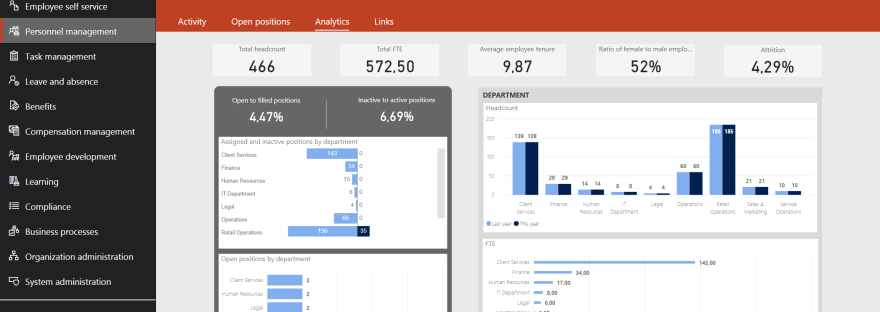
The next point under Understand the Dynamics 365 for Talent Environment (25 - 30%) is; Use People Analytics and Personnel Management in Dynamics 365 for Talent Describe features of the People workspaceuse the People workspace to view and edit personal informationenroll in benefits by using the people workspacecheck FMLA eligibilityrequest time-off in the People workspaceview… Continue reading MB6-898 Use People Analytics and Personnel Management in Dynamics 365 for Talent

Finally Microsoft have come with the long anticipated Talent to Finance and Operations template based on The Data integrator. You need Talent on CDS for apps (CDS 2.0) and Finance and Operations on version 7.2 or later. Maintain the following information in Talent and sync it to Finance and Operations: JobsPositions and position assignmentsEmploymentsWorkers and worker… Continue reading Integration from Dynamics 365 for Talent to Dynamics 365 for Finance and Operations
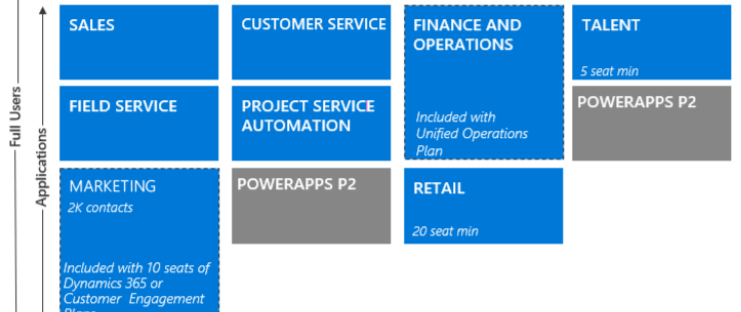
To use Dynamics 365 for Talent you need to first buy the license. What kind of license you should buy depends on your organisation, there are (as of October 2018) four options witch includes Talent: Unified Operations Plan (With the full ERP suite - formerly know as Dynamics AX)Dynamics 365 Plan (With the full Dynamics… Continue reading MB6-898 Set up core prerequisites and parameters for using Dynamics 365 for Talent

The search in the web interface lets you search pages that contains one or more of the words you are typing. You always get the closest hit at the top, and then the other pages and sections that contains the words you are searching for below.
 Malin Martnes