The first skillset that's testet in the Configure and Use the Onboarding, Offboarding, and Transition Processes (20 - 25%) is Use the Onboarding Modular application, this contains: Describe scenarios for using the onboarding modular applicationcreate, import and migrate employees into the Onboarding modular application
Tag: Certification
MB6-898 Configure and Use the Onboarding, Offboarding, and Transition Processes (20 – 25%)
The third skill tested is Configure and Use the Onboarding, Offboarding, and Transition Processes, this lists the following points: Use the Onboarding Modular application Describe scenarios for using the onboarding modular application; create, import and migrate employees into the Onboarding modular application Design and configure welcome guides Describe the components of a welcome guide; create… Continue reading MB6-898 Configure and Use the Onboarding, Offboarding, and Transition Processes (20 – 25%)
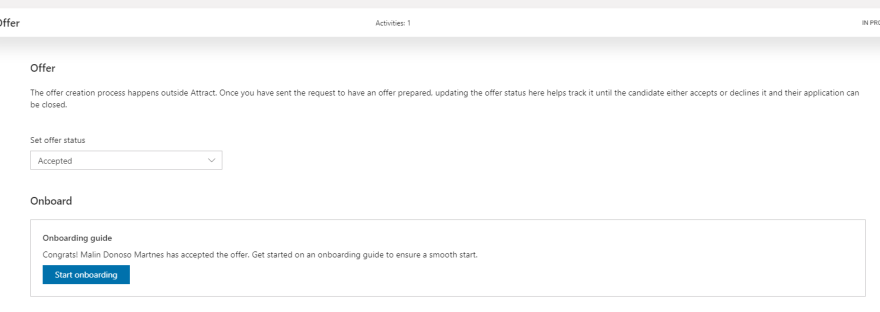
MB6-898 Start the onboarding process
When you change the offer stage status to Accepted or the candidate has accepted the offer a new area appears - Onboard. With the offer app used: Offer accepted Without the offer app: Offer settings accepted With this function you click the button "Start onboarding" and the new employee is transferred to the onboarding app and… Continue reading MB6-898 Start the onboarding process
MB6-898 Maintain the status of the offer
How you maintain the status of the offer in Dynamics 365 for Talent
MB6-898 Define offer settings
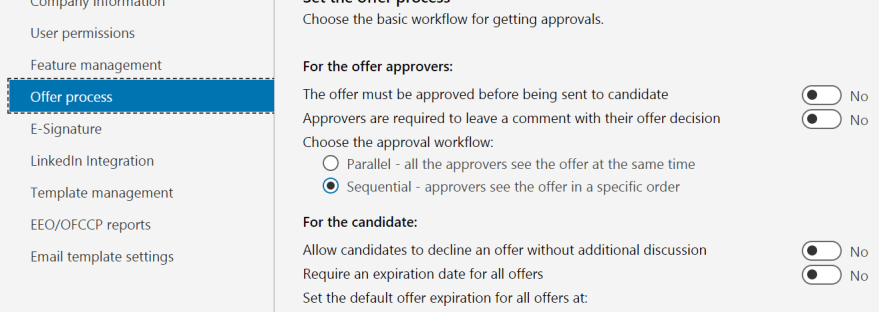
In the Offer stage on the job you have three options you can change: Launch Offer Management App on prepare offer (requires the comprehensive hiring SKU/Add-on)Hiring Managers can prepare offer. This is only available if the previous setting is on.Allow Positions to be reused within job. In the admin center you can define the offer… Continue reading MB6-898 Define offer settings
 Malin Martnes