The third skill tested is Configure and Use the Onboarding, Offboarding, and Transition Processes, this lists the following points: Use the Onboarding Modular application Describe scenarios for using the onboarding modular application; create, import and migrate employees into the Onboarding modular application Design and configure welcome guides Describe the components of a welcome guide; create… Continue reading MB6-898 Configure and Use the Onboarding, Offboarding, and Transition Processes (20 – 25%)
Tag: Dynamics 365

Top 10 in December 2018 Blog Leaderboard Dynamics 365 Community
In October I was number 6 in the blog leaderboard in the Microsoft Community, In November I made it to number 4. In December I made it to top 3! It's still a lot of work, but I have about 70 more posts on the Mb6-898 certification before I'm done with that, so keep following me… Continue reading Top 10 in December 2018 Blog Leaderboard Dynamics 365 Community
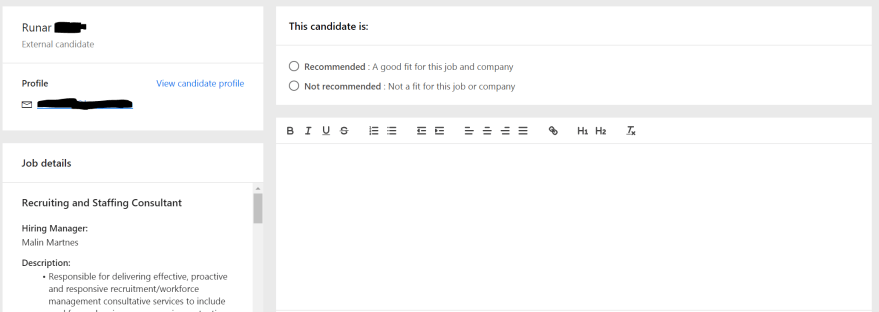
MB6-898 Conduct interviews and provide interview feedback and recommendations
After you conduct the interviews you have to register some feedback on the candidate. Click "Provide feedback" Provide feedback on candidate A new site opens where you say if you would recommend or not recommend the candidate for the job and write a description on why you would or wouldn't recommend the candidate. Feedback registration… Continue reading MB6-898 Conduct interviews and provide interview feedback and recommendations

MB6-898 Send schedule and summary to the interview team
When you are done scheduling the interview you send the invitation to the interviewer(s) by clicking the button "Send to interviewers" Send to interviewers You then need to review the interview details ans customize the email you are sending to the interviewers. Interview send schedule to interviewer To send the summary to the interviewer you… Continue reading MB6-898 Send schedule and summary to the interview team

MB6-898 Schedule an interview
To schedule an interview you first advance to the Interview stage and click "Schedule an interview" Schedule an interview - create schedule Then you go on to adding interviewers and setting the conditions. Interview options When you click add you move on to the scheduling site where you see the candidate and the interviewer. If… Continue reading MB6-898 Schedule an interview
 Malin Martnes