Power Apps, Power Platform, What is and what is it used for

What is Canvas apps and what is it used for?

Canvas apps are low-code solutions in Microsoft Power Apps that enable users to create custom applications via a blank interface with drag-and-drop features. They integrate data from various sources, facilitating fast development of business tools. Their flexibility allows tailoring to specific tasks without extensive coding, improving efficiency across organizations.

Dynamics 365, Power Apps, Power Platform, What is and what is it used for

What is model-driven Power Apps and what is it used for?

Model-driven Power Apps utilize structured data models in Microsoft Dataverse as the foundation. These apps enable rapid development of data-rich, process-focused business applications, requiring minimal or no coding. They are perfect for varied scenarios, such as CRM, service management, and HR onboarding, ensuring consistency across devices.

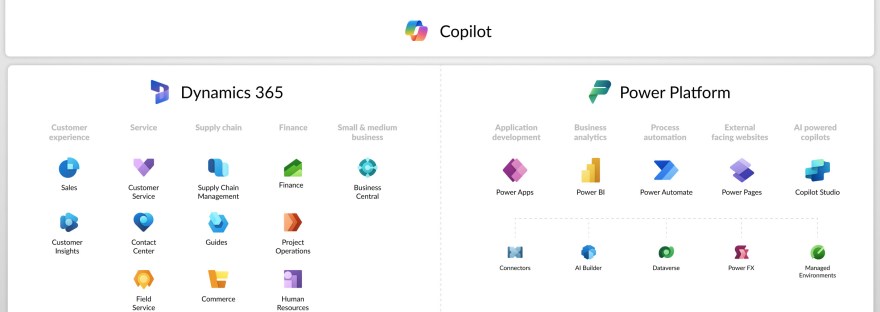
Image with all the icons of power platform and Dynamics 365
Customer Insights, Data, Dataverse, Dynamics 365, Journey, Power Apps, Power Automate, Power Platform, What is and what is it used for

What is <this tech> and what is it used for?

The blog series aims to provide an introductory guide to the Power Platform and Dynamics 365, addressing common questions about various technologies like Canvas apps, Dataverse, and Copilot Studio. It will feature insights from both AI and human experts, along with use cases from different customer sizes and resources for further learning.

Customer Insights, Journey, Power Apps

Enhance user experience with model driven Power apps

Read about a no-code enhancement for views in model-driven Power Apps. They focus on improving user experience in Customer Insights - Journeys by managing building and room data. By customizing views using the Power Apps grid control, users can efficiently access room information within buildings.