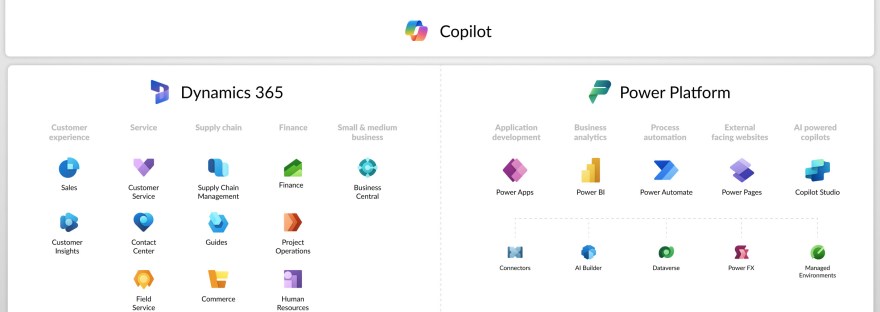
AI Builder is a no-code tool in Microsoft Power Platform that enables users to create and implement AI models. It automates repetitive tasks such as document and image processing, sentiment analysis, and data classification. Organizations utilize it to enhance efficiency, improve accuracy, and streamline workflows without requiring technical expertise.
Tag: Power Automate
What is Power Automate and what is it used for?
Power Automate is Microsoft's low-code automation platform that lets users create workflows connecting apps, services, and data. It offers cloud, desktop, and business process flows to automate tasks, reduce errors, and integrate systems. Its functionalities help organizations streamline operations, enhance efficiency, and enable intelligent automation.
What is <this tech> and what is it used for?
The blog series aims to provide an introductory guide to the Power Platform and Dynamics 365, addressing common questions about various technologies like Canvas apps, Dataverse, and Copilot Studio. It will feature insights from both AI and human experts, along with use cases from different customer sizes and resources for further learning.
Send an email when a contact submits a form in Customer Insights – Journeys
This is a post showing how to create a Power Automate that triggers when a contact submits a form in Customer Insights - Journeys, and then sends an email to the owning user of that contact.
Human Resources Release wave 1 2020
From 1th February 2020 Talent is renamed Human Resources and the Attract and Onboarding apps are retired. That doesn't mean that nothing new is happening! Access and maintain HR data in Common Data Service Moving on they'll be adding more and more entities and fields in the CDS. In my opinion this is the biggest… Continue reading Human Resources Release wave 1 2020